Essential Navigation and Cruising Apps Every Boater Should Know
After 30 years of cruising, I’ve found that well-designed apps make navigation safer, more efficient and often more enjoyable. From route planning and chart overlays to tide tables and customs clearance, modern apps reduce uncertainty and let you focus on the voyage. Below I summarize the best tools I use regularly — tested during long runs like a 2,500-nautical-mile Great Loop aboard a 55-foot Princess — and explain why each one earns a spot on my device.
Navionics Boating — my go-to charting app
Navionics Boating is my favorite navigation app. It is compatible with most onboard chartplotters and lets you sync routes between your phone, tablet and compatible MFDs. I plan many trips from home — drawing routes, checking bridge heights, previewing hazards and adjusting waypoints while relaxing onshore. Underway, I use the app on a tablet as a second plotter to re-route or check distances without touching the main display.
The app helps locate fuel docks and marinas, and you can enter vessel details such as LOA, draft and fuel burn so its autoroute functions optimize routes for your boat. Created routes automatically appear on your other devices and can be shared with friends who use Navionics. A yearly subscription for U.S. charts is roughly $50, which includes updated charts and information.
Aqua Maps — community-driven detail for coastal cruising
Aqua Maps is a slightly different tool: it typically doesn’t interface directly with onboard plotters, but it offers detailed charts and a strong community of users. It proved invaluable on the Intracoastal Waterway during my Great Loop. Many Loopers share tracks and local knowledge; I often followed trusted contributors through shifting shoals and complex channels. Those shared tracks, anchor recommendations and inlet notes can be particularly useful where charts and conditions change frequently.
Aqua Maps also includes an anchor alarm and robust weather overlays — wave and wind forecasts among them. Annual chart coverage for the U.S. and Canada is about $49.99.
Windfinder Pro — reliable wind, wave and buoy data
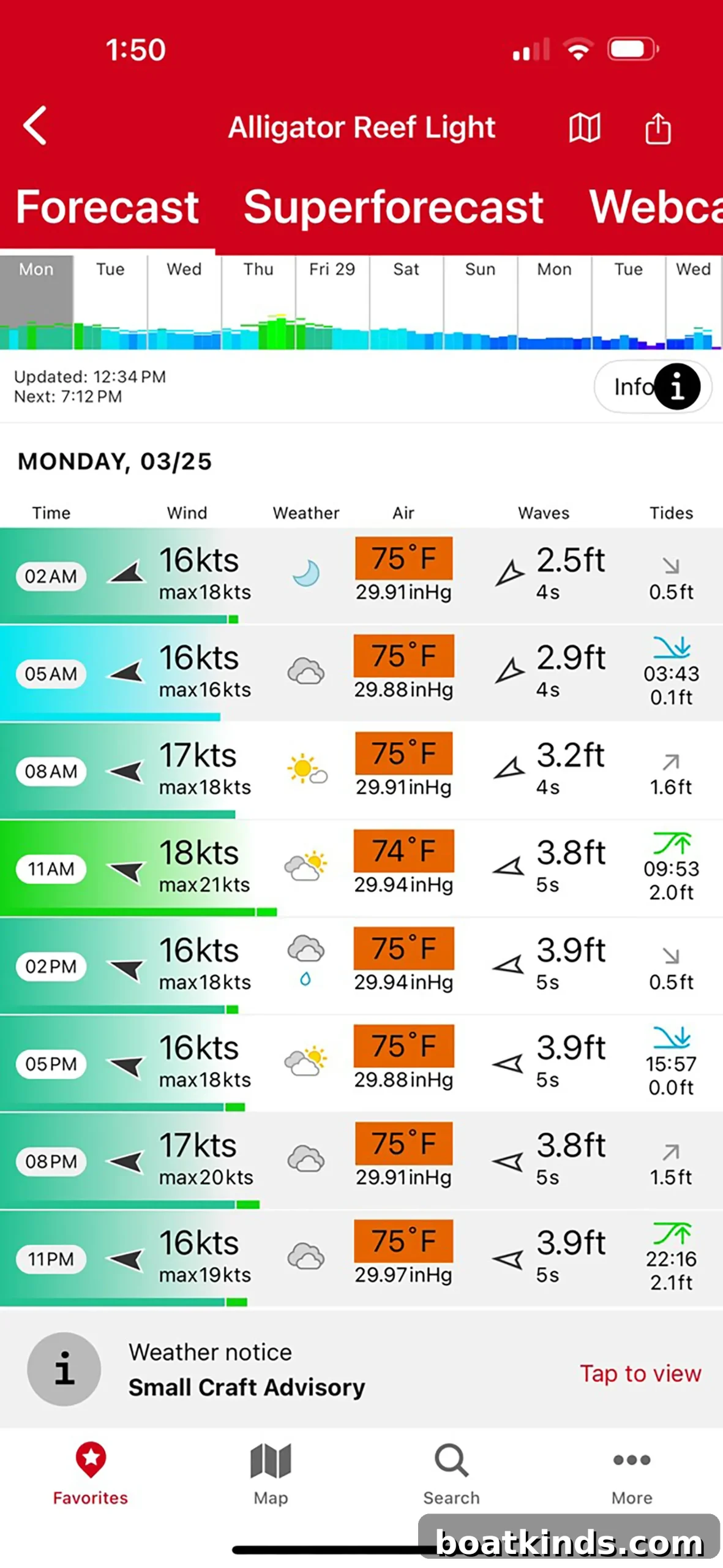
There are many weather apps, but I rely on Windfinder Pro for a concise mix of forecasts and live buoy readings. It pulls data from NOAA buoys and presents wind, waves and 10-day forecasts for any location. You can view wind maps, temperature and precipitation and even fetch real-time readings from individual buoys when planning crossings. I’ve used it to make confident, last-minute decisions — like an afternoon departure for a crossing to the Bahamas — and its low annual cost (around $4.99) makes it an easy addition to any mariner’s toolkit.
Tides Pro — quick, accurate tide tables
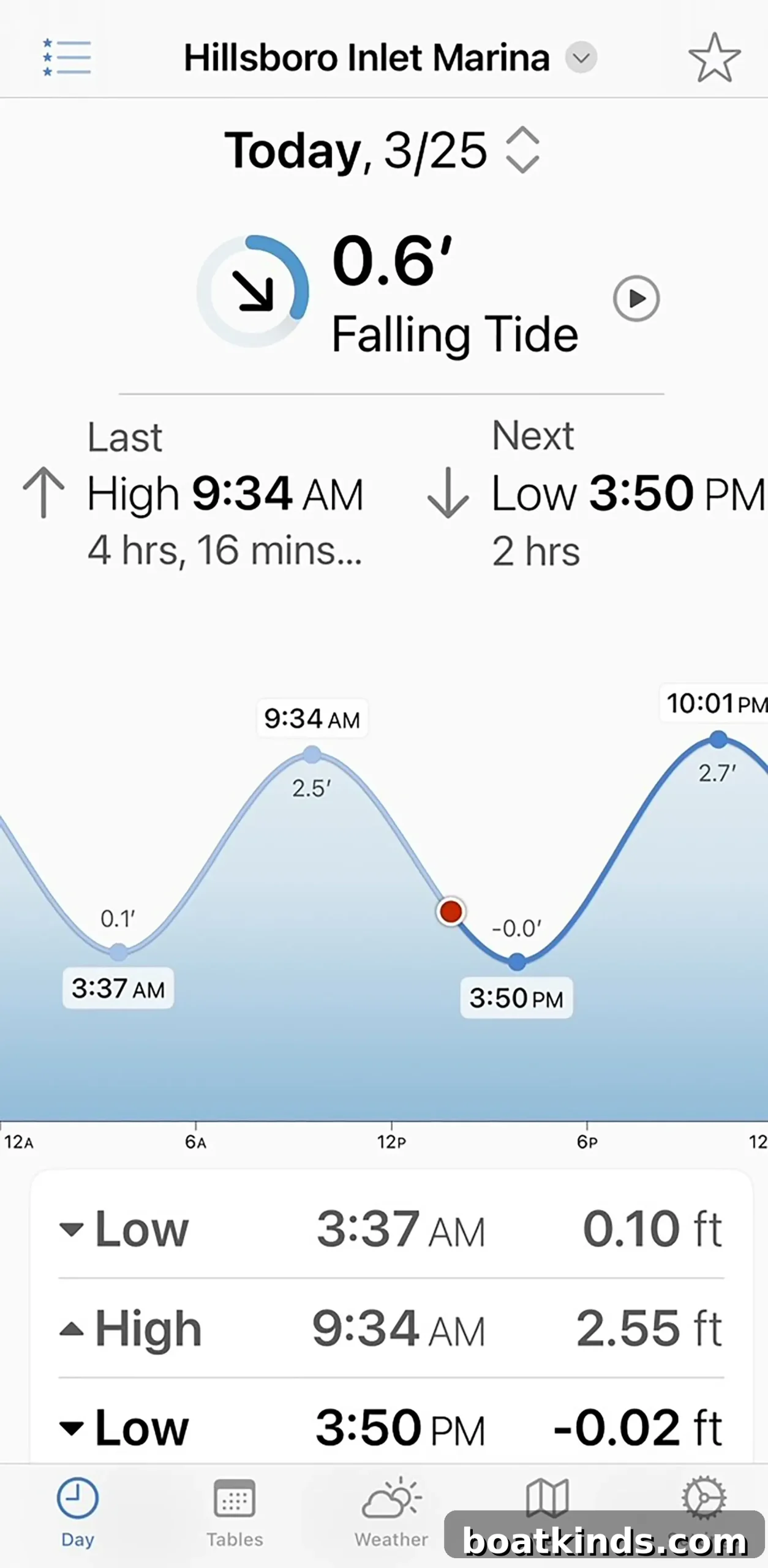
Tides Pro is an excellent, free resource for tide tables. It provides instant access to tide predictions for your current location or any destination, and can look up past and future tide information. For planning passages, entering or leaving shallow harbors, and timing lock transits, reliable tide data is essential and this app delivers it without cost.
Dockwa — simplified marina reservations
Dockwa is my preferred tool for finding and reserving slips. Think of it as an Expedia for marinas: browse by location, enter your arrival date and vessel length, and you’ll see availability, rates and property details. Dockwa lists VHF channels, phone numbers, reviews and other essentials; bookings are usually confirmed within a few hours. I use it for both last-minute reservations and planning months in advance to secure slips for specific events or season openings.
CBP Roam — required for U.S. re-entry
If you cruise outside the U.S., CBP Roam is mandatory for re-entry. This U.S. Customs app streamlines reporting for private vessels: you input vessel and passenger details, including passport data, port of origin and intended port of entry. On arrival you report through the app and a Customs officer typically conducts a video call; in rare cases a physical inspection or office visit may be required. It’s also wise to register a float plan with the U.S. Coast Guard before departure and have that number handy when returning.
Each of these apps addresses a specific part of cruising: charting and routing, local community knowledge, weather and buoy data, tide timing, marina logistics and customs clearance. Used together, they reduce uncertainty and give you more confidence to explore. Over three decades of cruising, these tools have become essential companions on both short coastal hops and longer bluewater passages.
This article was originally published in the June 2024 issue.